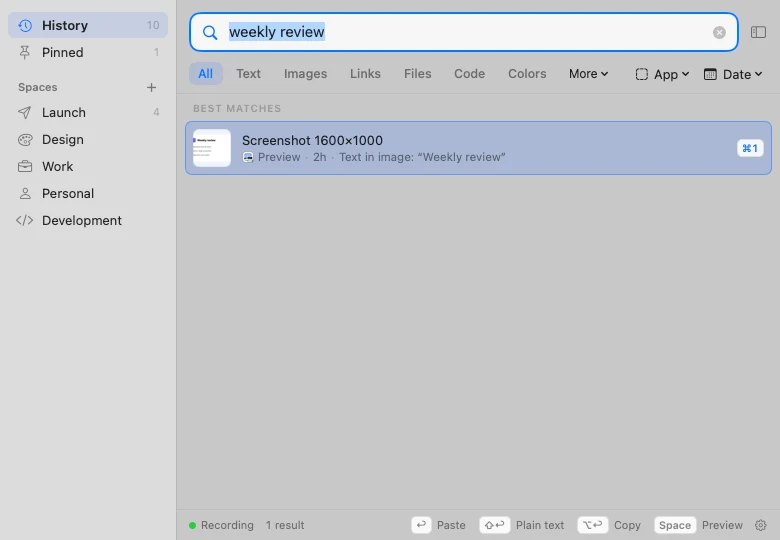
macOS
Native macOSSearch inside screenshots
Clipivo
A native macOS clipboard manager that remembers everything you copy, even the text inside screenshots.
Swift 6SwiftUIAppKitSQLite FTS5
Design & Engineering
View Details →Native Android apps in Kotlin and Jetpack Compose, and Apple-platform apps in Swift and SwiftUI. Built to work offline, run well on cheap phones and keep the data they hold safe.
4+ Years
Building systems
Remote + Onsite (Guwahati Area)
Clickable Prototype → Offline Data Layer → Store Release
Optimization Summary
Most mobile apps fail in the field the same few ways: they freeze on low-end phones, lose data offline, or store sensitive details in plain text.
“The app freezes or crashes on low-end, 2GB RAM phones.”
Native Kotlin with the heavy work off the main thread (Coroutines, WorkManager), memory profiling on real low-end devices, and lean Compose screens.
“Field agents lose entries when the network drops.”
Offline-first storage with Room or SQLDelight. Every form, coordinate and photo is saved on the device first and synced automatically when the network returns.
“Sensitive records are stored in plain text on the phone.”
SQLite encrypted with SQLCipher, keys held in the hardware-backed Android Keystore, and biometric unlock where it makes sense.
“Photos for verification are blurry or too large to upload.”
A tuned CameraX setup that resizes without losing readability, so meter and document photos stay legible and small enough for mobile data.
I build native apps for teams whose users are in the field, on patchy networks, or handling data that must stay private.
Organisations sending apps to field agents in low-coverage areas, like the Consumer Indexing App built during my APDCL internship for KYC and QR codes across 6.4M consumers.
Finance trackers and document apps that must keep records on the device and encrypted, like FYRA Finance, my offline-first double-entry ledger.
Teams registering sites in the field with GPS coordinates, geotagged photos and offline queues, like the Solar Rooftop Registration App.
Startups that want a clean native codebase from day one instead of a prototype that has to be thrown away after the first round of users.
You get the app, the source code and everything needed to keep shipping it without me.
Kotlin (Jetpack Compose) or Swift (SwiftUI) project with a clear separation of data, logic and UI, in your own Git repository.
Android App Bundles ready for Google Play plus APKs for sideloading, or a signed build for Apple platforms.
Typed schemas and migration scripts for the on-device database and any server it syncs with.
How keys are stored, what is encrypted, which domains the app may talk to, and how to rotate credentials.
How sync, offline queues and releases work, written so another developer can pick the project up.
The kinds of apps I have shipped, and keep building.
Forms, QR codes, document capture and GPS markers for agents working far from good coverage, syncing large volumes of records over poor networks (as in the Consumer Indexing App).
Apps where the data never needs a server: encrypted local databases, AES-GCM key envelopes and biometric unlock (as in FYRA Finance).
Swift and SwiftUI apps that feel at home on the platform. Clipivo, my Mac clipboard manager, searches everything you copy, including the text inside screenshots.
Native toolkits on both platforms, with the storage and security libraries I use in production.
How I build native mobile apps that survive the field: encrypted on-device databases, offline-first sync that copes with patchy networks, and camera and GPS capture tuned for low-end phones.
In native mobile development, client-side data protection is critical. Storing sensitive customer profiles, financial balances, or local scan logs in cleartext SQLite databases invites reverse-engineering exploits. I harden local databases by applying SQLCipher (AES-256 database encryption) and securing keys using the hardware-backed Android Keystore.
Hardware-Backed Key Storage
Saving database keys directly in cleartext XML SharedPreferences is a common security failure. Instead, I generate a random 256-bit AES key, wrap it inside an encryption envelope using the Android Keystore's MasterKey (stored inside secure hardware enclave chips), and decrypt it only during database instantiation.
Below is the Kotlin pattern I implement using SQLCipher to initialize secure, encrypted databases inside native Android systems:
import android.content.Context
import androidx.room.Room
import androidx.room.RoomDatabase
import net.sqlcipher.database.SQLiteDatabase
import net.sqlcipher.database.SupportFactory

fun getEncryptedDatabase(context: Context, dbKey: ByteArray): MyDatabase {
    // Generate a SupportFactory with the raw byte key retrieved from the Keystore envelope
    const val DB_NAME = "secure_local_ledger.db"
    val factory = SupportFactory(dbKey)

    // Load SQLCipher libraries into memory
    SQLiteDatabase.loadLibs(context)

    return Room.databaseBuilder(
        context.applicationContext,
        MyDatabase::class.java,
        DB_NAME
    )
    .openHelperFactory(factory) // Enforce SQLCipher database encryption
    .build()
}
Biometric Lock Binding
For high-security applications (like FYRA Finance), configure Keystore parameters to require active user biometric authentication (setUserAuthenticationRequired(true)) before keys can be retrieved to open the database.
Field agents operating mobile apps in remote regions of Assam frequently drop connectivity. To prevent user flow interruption or data loss, I deploy an offline-first local database design combined with transactional sync queues managed via Android's WorkManager.
Blocking Main Threads with Network Calls
A common mistake is attempting to upload data directly on the main UI thread during form submission. If the network is slow, the interface freezes, triggering Application Not Responding (ANR) warnings. Always save data to the local DB immediately, delegating uploads to background workers.
PENDING.import android.content.Context
import androidx.work.*
import java.util.concurrent.TimeUnit
fun scheduleDatabaseSync(context: Context) {
// Define constraints: Sync only when internet is connected
val constraints = Constraints.Builder()
.setRequiredNetworkType(NetworkType.CONNECTED)
.build()
// Create a one-time work request with exponential backoff retries
val syncRequest = OneTimeWorkRequestBuilder<DatabaseSyncWorker>()
.setConstraints(constraints)
.setBackoffCriteria(
BackoffPolicy.EXPONENTIAL,
OneTimeWorkRequest.MIN_BACKOFF_MILLIS,
TimeUnit.MILLISECONDS
)
.build()
// Enqueue the work as unique, preventing duplicate sync queues
WorkManager.getInstance(context).enqueueUniqueWork(
"unique_db_sync_job",
ExistingWorkPolicy.REPLACE,
syncRequest
)
}
Consumer Indexing App Scale
During the development of the Consumer Indexing App, field agents had to log GPS coordinates and meter photos for millions of consumers across Assam under poor network coverage. By implementing a native Room DB offline queue, agents could work seamlessly offline. The app synced over 6.4 million consumer entries without a single database crash or record loss.
To capture verifiable field records (such as solar panel rooftops locations), apps must interface directly with native hardware sensors:
Short phases, each ending with something you can install and try.
Phase 1 of 7
We list the jobs the app has to do, who uses it and where. I turn that into a screen map and a clickable prototype you can tap through on your phone.
Dynamic projects fetched from the portfolio database demonstrating execution.
A native macOS clipboard manager that remembers everything you copy, even the text inside screenshots.
Design & Engineering
View Details →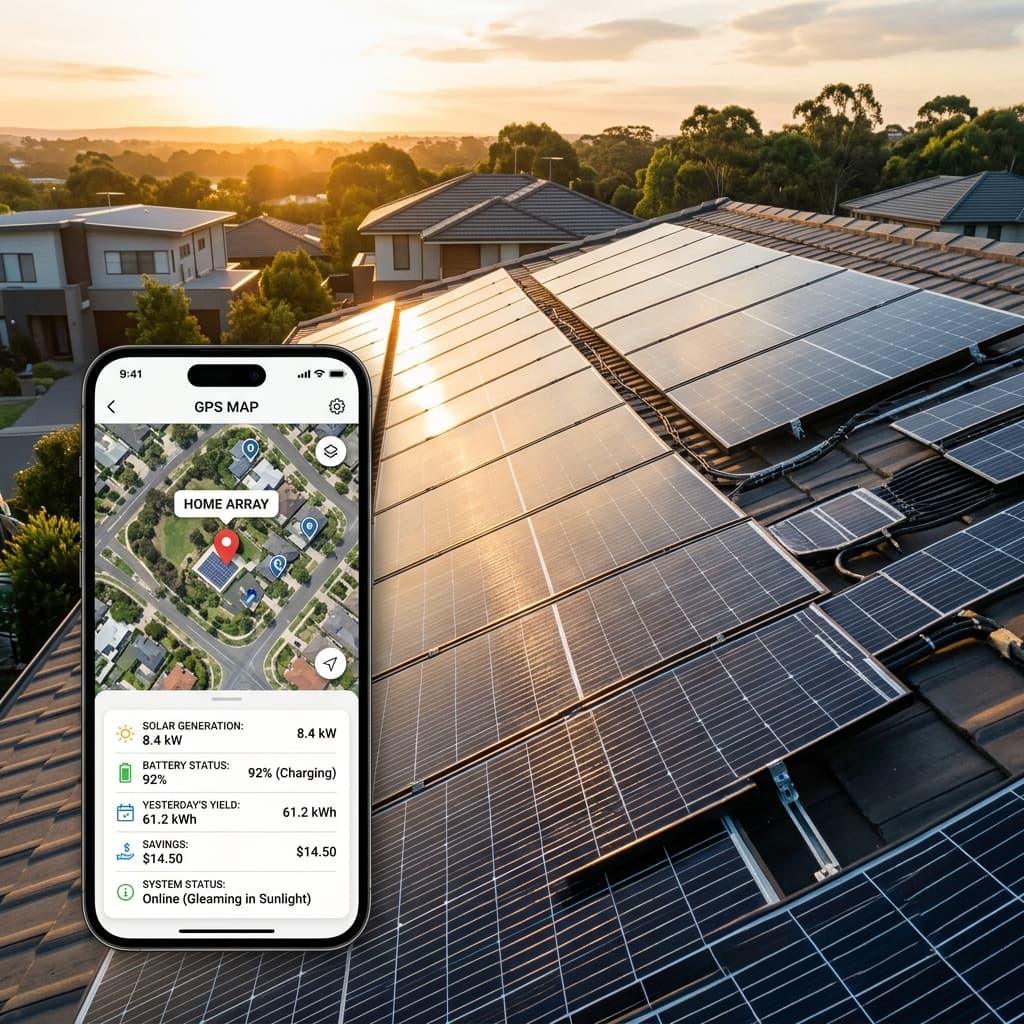
Android app with GPS mapping for solar installations
Android Developer
View Details →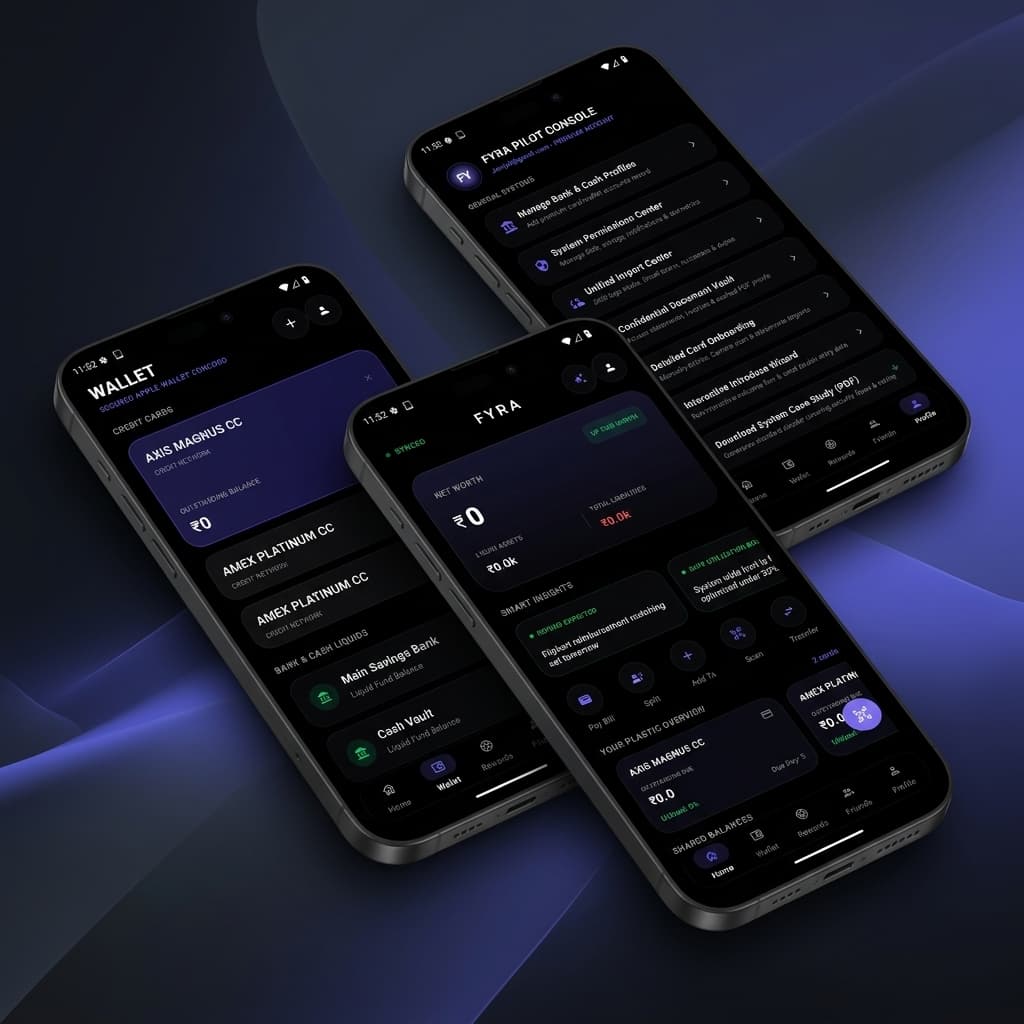
A Private, Offline-First Double-Entry Ledger System
Android & Security Engineer
View Details →Cross-platform shortcuts often struggle on low-end phones and with background work. Native code costs a little more up front and much less in support later.
| What Matters | Native App (My Approach) | Typical Cross-Platform Template |
|---|---|---|
| Performance on Low-End Phones | ✓ Native code profiled on 2GB RAM devices. | ⚠️ Heavier runtime; can stutter on budget phones. |
| Offline Work | ✓ Local-first storage with automatic background sync. | ⚠️ Often assumes a connection; offline added later. |
| On-Device Data Security | ✓ SQLCipher encryption with Keystore-held keys. | ⚠️ Plain local storage unless someone adds encryption. |
| Hardware Access | ✓ Direct use of camera, GPS and biometrics APIs. | ⚠️ Depends on third-party plugins for each feature. |
Based in Guwahati, I build mobile apps for organisations across Assam, with field testing in the districts where the app will actually be used, including Jorhat, Dibrugarh, Silchar, Nagaon and Tezpur.
For clients elsewhere in India (Bengaluru, Hyderabad, Pune, Mumbai, Delhi NCR) and abroad, I work remotely through GitHub, share test builds every week, and keep you updated over calls.
Structured query answers targeting specific informational searches.
Tell me who will use it and where. I'll come back with a plan, a timeline and a clickable first version.